NEWS RecovR is now available for dealerships in the USA
Call us at: 844-716-2472

Locators that are on-site at another location within the same company will no longer be marked as lost. Additionally when Reconciling a lost locator, if it is on-site at a sister location it will be marked as found and credited appropriately.
Previously when entering Tag IDs on PEN Sales upper case letters would not be accepted. This information is now case insensitive and will accept any combination of upper and lower case characters.
We have gotten a lot of feedback that the map icon aggregations are not always helpful. With this release we will allow users to turn this feature on or off as desired.


NOTE: When this feature is disabled the number of positions shown will be limited to the amount set on the pagination

We additionally will track how often users turn this feature on or off in order to better understand how useful this feature is for users.
Current State
This will update from Lost to Found when it is Found via Reconciliation, Pairing, or manually being marked as Found.

Reconciliation History
This will show the date and time that a Reconciliation is performed, as well as the result if the Locator is on-site vs off-site.

Billing State
This will show any record of Billing State changes, e.g. from Not Yet Billed to Never Billed when it is billed on an invoice.

When a locator receives a position with accuracy worse than 100m we will retry the position update up to 3 times.
With this change anytime a locator receives an inaccurate position (common with cell/wifi positions) it will retry up to 3 times in an attempt to get a better position. This process takes place over several hours since the request must be sent from the back-end on the next heartbeat.
Previously when multiple locations within the same company were located in close proximity and auto-transfer was enabled for these locations sometimes a locator would move back and forth between locations. This would often happen when the accuracy circle for a given vehicle encompassed zones from multiple locations.

This release updates the auto-transfer logic so that a locator will only transfer to a sister location when it is not onsite (within .1 miles of any zone) for the location to which it is assigned. This helps in situations we have seen in the past where a locator jumps back and forth between locations when they are in close proximity.
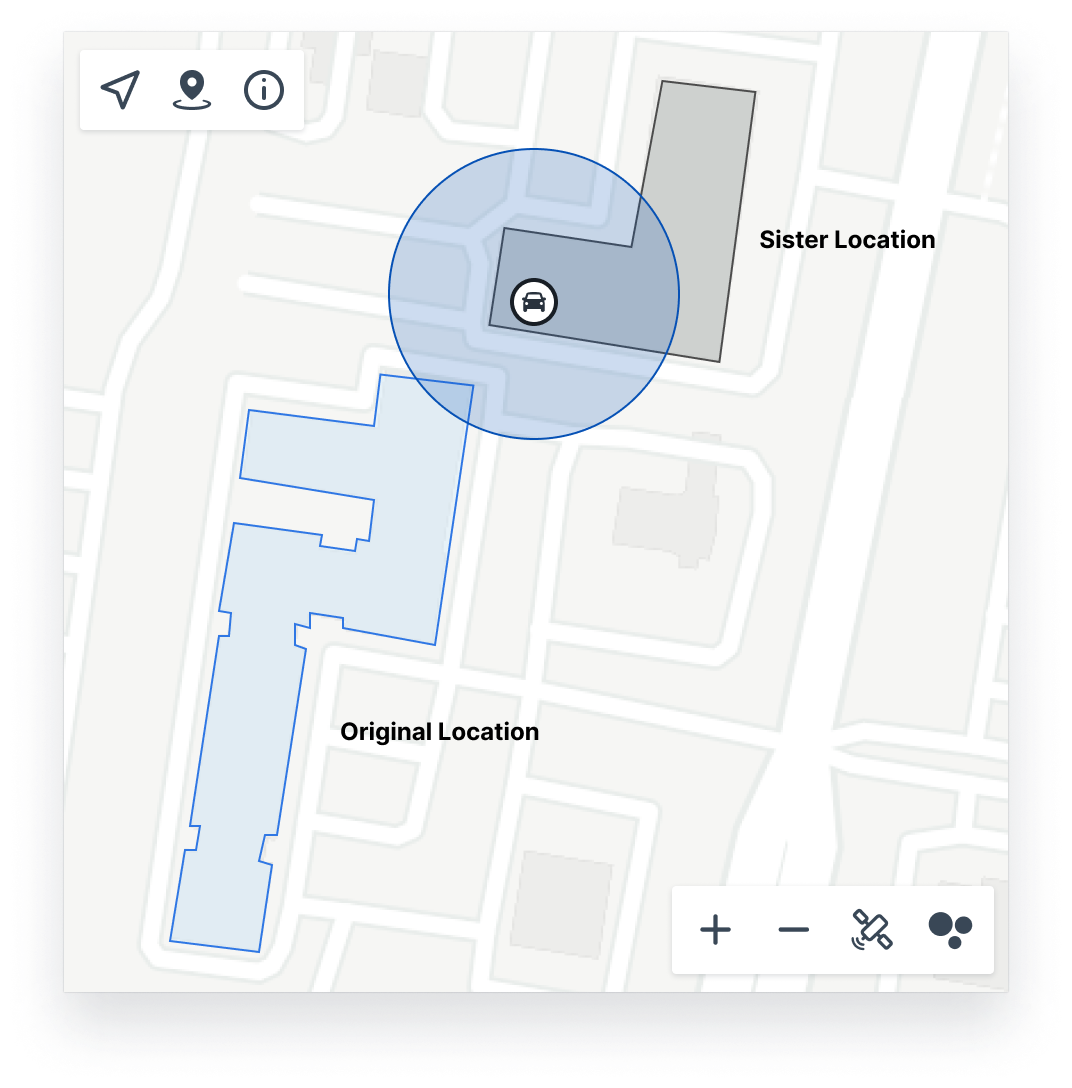

These vehicles remain in their original location and will NOT transfer as the vehicle is still onsite (within < .1 miles from the nearest zone) at the original location.
Ever had a customer buy a vehicle with RecovR only to find out when they get home that the locator wasn't inside the car? Well now you can set up alerts to warn you when this happens!
You can now enable alerts to send an email for the situations outlined below. This wll allow you to correct the problem before the customer ever leaves the lot.

Unlike many of our alerts, this alert will not go to Location Admins, but rather to a list specified on the Location Alerts Page.


You can specify a list of users to receive these alerts. Users are not required to have a RecovR account in order to receive these alerts.
When a paired vehicle is marked as sold it enters a Sale Pending state until the locator is unpaired from the vehicle. If enabled you can now get an alert when this happens letting you know to grab the locator before the customer takes it home preventing a charge for a lost locator.
An email or text will be sent to specified Dealership staff notifying them of the sale and instructing them to unpair the locator.


While in the Lot Management UI we require a locator in order to create a RecovR Sale, if your dealership is using PEN to integrate with RecovR you may not get any warning that a locator wasn't paired to the vehicle. Now you can get an alert letting you know!
As of this release we will now send an email or text to specified users letting them know that a customer purchased RecovR but the vehicle was missing a locator.


While in the Lot Management UI we prevent RecovR sales where the paired locator is offline, if your dealership uses PEN to connect to RecovR you may not get a warning when this happens. Now you can get a text letting you know so that you can replace the locator with a working one before the customer goes home!
As of this release we will send an email or text to specified dealership staff letting them know that the locator should be replaced prior to the customer taking the vehicle home.


It doesn't happen a lot, but sometimes locators can stop working for various reasons. This is easy to correct, but you need to know when it happens.
In this release we have added an alert that you can enable to send a weekly email notifying you of any vehicles with a paired locator that is offline.

To use this feature you can enable it on the Location Alerts page in your side navigation.

Zones had stopped drawing in Map View, which left you with no way to see at a glance where anything actually sat on your lot. They show up again for Vehicles, Keys, Tags, and Locators.
Looking back at where a vehicle has been should be fast, and on an iPhone it should not take the app down with it. Both are better in this patch.
Tracking down a misplaced key used to mean walking the lot and hoping to hear it. Tap Find Tag or Find Key on an asset and a new screen rings it straight from your phone, with a map showing where you are standing and where the tag was last seen.
A new RecovR tab sits in the bottom navigation bar. It is a direct line to the support team and to the help articles, so a question about a locator no longer means switching to email and describing your setup from scratch.
Pairing used to fail without telling you why. The app now gives the same reasons the web interface does, so you know whether to grab a different tag or just wait.
Thanks for protecting your vehicle with ReocvR. In this release, we've fixed a bug so that you can start onboarding directly after downloading the app from your invitation email.
We've improved the onboarding experience and made a few small improvements around the app.