RecovR Release Notes

Dealers

Lot Management 1.49.0

September 6, 2024

Coming Soon!

Lost Locator Logic Improvements

Locators that are on-site at another location within the same company will no longer be marked as lost. Additionally when Reconciling a lost locator, if it is on-site at a sister location it will be marked as found and credited appropriately.

‍

Case insensitive KeyTag ID on PEN sales

Previously when entering Tag IDs on PEN Sales upper case letters would not be accepted.  This information is now case insensitive and will accept any combination of upper and lower case characters.

‍

🐛 Fixed

‍

  • Close Of Business Daily Report was not showing proper values for Vehicles Added.  This has been fixed.

‍

Dealers

Lot Management 1.48.0

August 7, 2024

Coming Soon!

🐛 Fixed

  • Invoice link to show Sales should not filter Voided sales
  • Color swatch does not automatically update Color Name when Bulk Editing Vehicles
  • Filtering Sales on ProductTypes doesn’t work properly

‍

Dealers

Lot Management 1.47.0

July 10, 2024

Coming Soon!

🚀 New Features

🚗 Ability to Enable/Disable Map Icon Aggregations

We have gotten a lot of feedback that the map icon aggregations are not always helpful.  With this release we will allow users to turn this feature on or off as desired.  

aggregationOn.png
aggregationOff.png

NOTE: When this feature is disabled the number of positions shown will be limited to the amount set on the pagination

paginationComparison.png

We additionally will track how often users turn this feature on or off in order to better understand how useful this feature is for users.

🚗  Lost Locator History

Current State

This will update from Lost to Found when it is Found via Reconciliation, Pairing, or manually being marked as Found.

markedByRecovRReconciliationTable.png

Reconciliation History

This will show the date and time that a Reconciliation is performed, as well as the result if the Locator is on-site vs off-site.

intercomReconciliationTable.png

Billing State

This will show any record of Billing State changes, e.g. from Not Yet Billed to Never Billed when it is billed on an invoice.

billingStateReconciliationTable.png

‍

‍

🚗 Automatic Position Retries

When a locator receives a position with accuracy worse than 100m we will retry the position update up to 3 times.
‍

With this change anytime a locator receives an inaccurate position (common with cell/wifi positions) it will retry up to 3 times in an attempt to get a better position.  This process takes place over several hours since the request must be sent from the back-end on the next heartbeat.

‍

‍

🚗 Auto-transfer Zone Logic

Previously when multiple locations within the same company were located in close proximity and auto-transfer was enabled for these locations sometimes a locator would move back and forth between locations.  This would often happen when the accuracy circle for a given vehicle encompassed zones from multiple locations.  

image.png

This release updates the auto-transfer logic so that a locator will only transfer to a sister location when it is not onsite (within .1 miles of any zone) for the location to which it is assigned.  This helps in situations we have seen in the past where a locator jumps back and forth between locations when they are in close proximity.
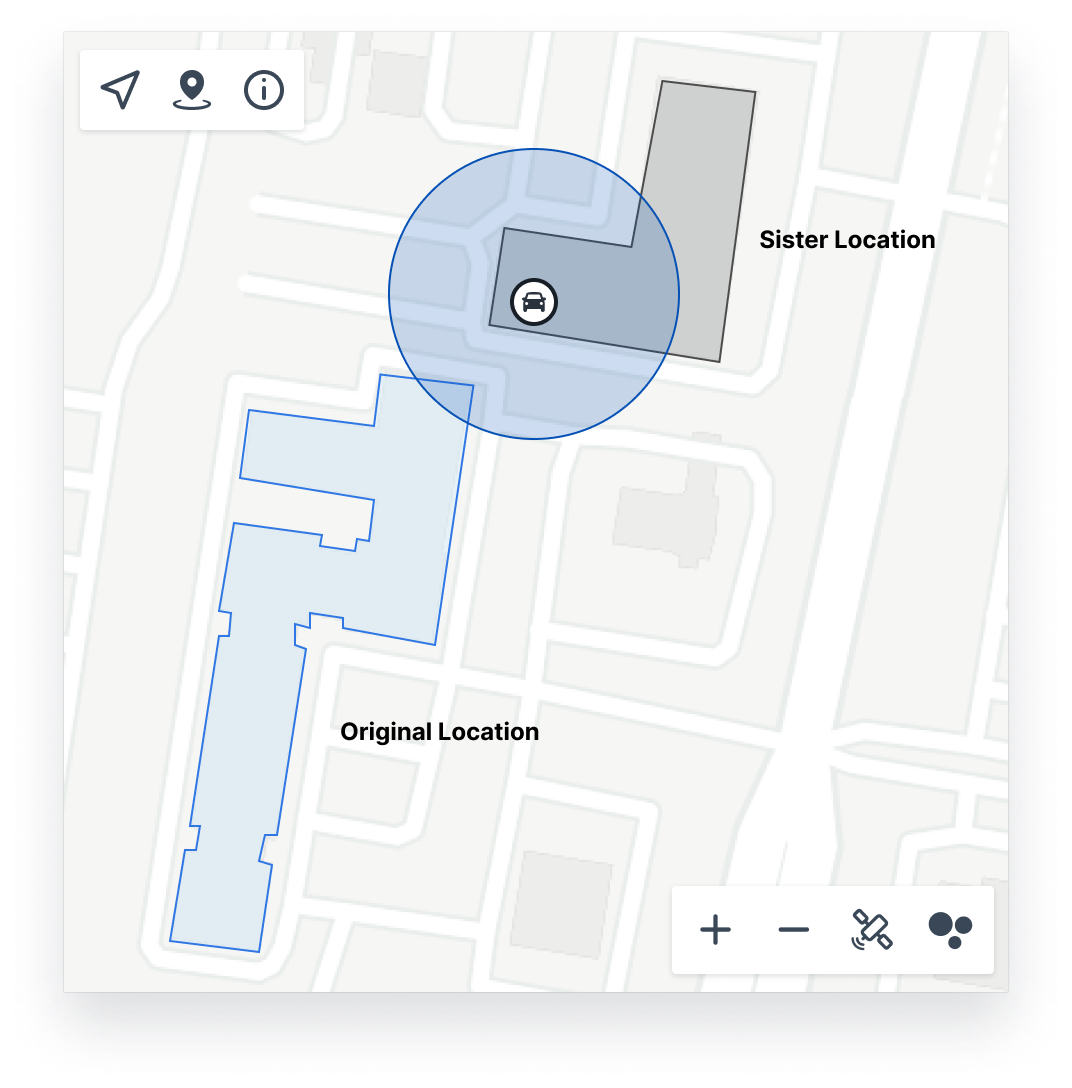
image.png
image.png

These vehicles remain in their original location and will NOT transfer as the vehicle is still onsite (within < .1 miles from the nearest zone) at the original location.

‍

‍

Dealers

Lot Management 1.46.0

May 8, 2024

Coming Soon!

Pending Sale Offline Locator Notifications

Ever had a customer buy a vehicle with RecovR only to find out when they get home that the locator wasn't inside the car?  Well now you can set up alerts to warn you when this happens!

‍

You can now enable alerts to send an email for the situations outlined below.  This wll allow you to correct the problem before the customer ever leaves the lot.

image.png

Unlike many of our alerts, this alert will not go to Location Admins, but rather to a list specified on the Location Alerts Page.

Screenshot 2024-04-28 at 10.51.08 AM.png
Screenshot 2024-04-28 at 10.51.55 AM.png

You can specify a list of users to receive these alerts.  Users are not required to have a RecovR account in order to receive these alerts.

  • Registered RecovR Users
  • Non-Registered Users
    • Will be sent the alert based on the designated method used when adding them.
    • Any valid phone number or email can be added
    • Users will have the option to opt-out of these alerts through our 3rd party sending tools. (Twilio for SMS or Mailgun for Email)

Paired vehicles sold as Vehicle Only

When a paired vehicle is marked as sold it enters a Sale Pending state until the locator is unpaired from the vehicle.  If enabled you can now get an alert when this happens letting you know to grab the locator before the customer takes it home preventing a charge for a lost locator.

An email or text will be sent to specified Dealership staff notifying them of the sale and instructing them to unpair the locator.

image-20240423-191123.png
image-20240423-191140.png

Unpaired vehicles sold with RecovR

While in the Lot Management UI we require a locator in order to create a RecovR Sale, if your dealership is using PEN to integrate with RecovR you may not get any warning that a locator wasn't paired to the vehicle. Now you can get an alert letting you know!

As of this release we will now send an email or text to specified users letting them know that a customer purchased RecovR but the vehicle was missing a locator.  

image-20240423-191111.png
image-20240423-191135.png

Paired vehicles sold with an offline locator

While in the Lot Management UI we prevent RecovR sales where the paired locator is offline, if your dealership uses PEN to connect to RecovR you may not get a warning when this happens. Now you can get a text letting you know so that you can replace the locator with a working one before the customer goes home!

As of this release we will send an email or text to specified dealership staff letting them know that the locator should be replaced prior to the customer taking the vehicle home.

image-20240423-191118.png
image-20240423-191138.png

Proactive Notification of Offline Paired Locators

It doesn't happen a lot, but sometimes locators can stop working for various reasons. This is easy to correct, but you need to know when it happens.

In this release we have added an alert that you can enable to send a weekly email notifying you of any vehicles with a paired locator that is offline.  

image-20240320-202048.png

To use this feature you can enable it on the Location Alerts page in your side navigation.

image.png

‍

Dealers

Dealer App 1.0.54

June 10, 2026

🗺️ Your Zones Are Back on the Map

Zones had stopped drawing in Map View, which left you with no way to see at a glance where anything actually sat on your lot. They show up again for Vehicles, Keys, Tags, and Locators.

⚡ Position History That Loads Quickly and Stays Up

Looking back at where a vehicle has been should be fast, and on an iPhone it should not take the app down with it. Both are better in this patch.

  • History covering less than a month now takes the quick route rather than the one built for long-range lookups, so recent history comes back faster

🐛 Fixed

  • The date and time range filter shows again on the vehicle map, so you can narrow history down to the window you care about
  • On Android, the Mute and Unmute button is no longer hidden behind your phone's navigation bar while a tag is ringing — the app now leaves room for it

‍

Dealers

Dealer App 1.0.53

May 19, 2026

🔔 Ring a Tag or Key From Your Phone

Tracking down a misplaced key used to mean walking the lot and hoping to hear it. Tap Find Tag or Find Key on an asset and a new screen rings it straight from your phone, with a map showing where you are standing and where the tag was last seen.

  • The screen moves through Press Play, Connecting, and Ringing, so you always know whether it has reached the tag yet
  • Pause stops the sound whenever you want, and Mute silences it while the lights keep flashing, so you can keep hunting quietly in a showroom

💬 Get Help Without Leaving the App

A new RecovR tab sits in the bottom navigation bar. It is a direct line to the support team and to the help articles, so a question about a locator no longer means switching to email and describing your setup from scratch.

  • Message support and see your whole conversation history in one place
  • Push notifications tell you when support replies, and tapping one drops you back into the conversation
  • Search the help articles and tutorials without leaving the app

🔑 Clearer Errors When a Tag Will Not Pair

Pairing used to fail without telling you why. The app now gives the same reasons the web interface does, so you know whether to grab a different tag or just wait.

  • Low Battery appears for any tag under 50 percent, so you find out before the tag goes in the car
  • Tag Not in Range appears when a tag has not checked in for more than ten minutes

🐛 Fixed

  • On Android, tapping the hotline number now opens your dialer instead of doing nothing

‍

Consumer App

iOS Release 1.15.0

January 24, 2023

What's New

  • Theft recovery mode notifications - When theft recovery is mode is activated, users will be notified via Push, Email, & SMS notifications. These notifications contain further instructions on how to get help and give them direct access to the theft recovery URL to share with law enforcement.
  • Notification configuration & robustness - While building out the theft recovery mode notifications, we have fleshed out notifications to be more easily configured and scaled to future notifications that we would like to implement. Users can disable email and SMS notifications from their app settings and disable push notifications in their phone settings.
  • “Update Required” pop-up - Previously, we have had no way to force users to update their app when they have been using out-of-date versions. We have introduced this functionality in the native app so that if we release any breaking changes in the future, we will be able to force them to update. Note: This is not a backward compatible feature, so we will not be able to force users to update who are using version released before Audi A3

Consumer App

Android Release 1.14.68

October 31, 2022

What's New

  • [LIVE] Consumer Account Activation Updates — Previously, consumers would click a checkbox that mentioned that they had agreed to both the Privacy Notice and the Terms & Conditions. This is not sufficient to obtain meaningful consent from users. It also does not comply with some regions’ (e.g. Canada) data privacy laws. There are a few updates we’ve made to be compliant with legislation and more transparent with our users:
  • We will now surface Key Highlights that provide a high level summary of our data privacy practices before users consent to the Privacy Notice. You can read the full Key Highlights here.
Screen Shot 2022-10-20 at 7.35.33 AM.png
  • We have also updated the checkboxes:
  • We have separated out the Privacy Notice and the Terms & Conditions (RecovR Vehicle Location and Theft Recovery Device Agreement) into two separate checkboxes. Both are required.
  • We have added an additional checkbox to allow users to opt-in or out of marketing communications (note: this does not impact our ability to send email or SMS alerts from the native app). This is optional.
  • The options that the user selects will be stored in user metadata in case we need to filter out consumers from receiving marketing communications or provide proof that they have opted-in to the legal terms.
  • [LIVE] Adding Additional Information to “My Data” — It’s important that users have transparency and control over their personal data. We currently have no automated way of deleting historical data, so we have provided some additional instructions on how to ask questions around our Data Privacy Practices and request data deletion. The “Chat” option will open an Intercom message with a pre-filled message, “Hello, I have a question or request regarding the Privacy Notice or my personal information.”
image.png
  • [LIVE] Update “State” selections and displays to include Canadian Provinces — Users are able to select the State for their Contact Address as well as for the License Plate Information. This has been updated to say “State/Province” in the selection and contain Canadian provinces as options.
  • [LIVE] Adding Toll-Free Canada Support Phone Number — Anywhere we are currently displaying the support phone number, we are now providing options for the user to select the US or Canada support number.
  • [LIVE] Various Copy and Icon Consistency Updates — There were a few different places where we had inconsistencies in how we refer to the Mobile App or the service. There were also some inconsistent iconography. We’ve cleaned these items up to provide a more consistent experience to users
  • [LIVE] Remove Photo Action Update — Previously, users would see the option to remove their vehicle photo even if they hadn’t uploaded one. We’ve removed this so that they will only see it when a photo is currently added.
  • [LIVE] Disable Email Updates for Metadata Changes — Previously, an email would send to consumers anytime their user metadata is updated. There are a few things that are saved in user metadata, such as the data sale permission on the “My Data” screen (see screenshot below). The email for these updates is not the most usable and can be a little startling to users especially because it is sent when they first activate their account. This is because this permission isn’t set until the account is activated, and the system recognizes this as an update. We have decided to temporarily disable these emails since they are causing alarm from users, which would be further exacerbated in this release because their opt-in to the Terms & Conditions and Privacy Notice are also stored as user metadata. Users will still receive similar emails when their password or contact information is changed.
image.png


Consumer App

iOS Release 1.14.86

October 31, 2022

What's New

  • [LIVE] Consumer Account Activation Updates — Previously, consumers would click a checkbox that mentioned that they had agreed to both the Privacy Notice and the Terms & Conditions. This is not sufficient to obtain meaningful consent from users. It also does not comply with some regions’ (e.g. Canada) data privacy laws. There are a few updates we’ve made to be compliant with legislation and more transparent with our users:
  • We will now surface Key Highlights that provide a high level summary of our data privacy practices before users consent to the Privacy Notice. You can read the full Key Highlights here.
Screen Shot 2022-10-20 at 7.35.33 AM.png
  • We have also updated the checkboxes:
  • We have separated out the Privacy Notice and the Terms & Conditions (RecovR Vehicle Location and Theft Recovery Device Agreement) into two separate checkboxes. Both are required.
  • We have added an additional checkbox to allow users to opt-in or out of marketing communications (note: this does not impact our ability to send email or SMS alerts from the native app). This is optional.
  • The options that the user selects will be stored in user metadata in case we need to filter out consumers from receiving marketing communications or provide proof that they have opted-in to the legal terms.
  • [LIVE] Adding Additional Information to “My Data” — It’s important that users have transparency and control over their personal data. We currently have no automated way of deleting historical data, so we have provided some additional instructions on how to ask questions around our Data Privacy Practices and request data deletion. The “Chat” option will open an Intercom message with a pre-filled message, “Hello, I have a question or request regarding the Privacy Notice or my personal information.”
image.png
  • [LIVE] Update “State” selections and displays to include Canadian Provinces — Users are able to select the State for their Contact Address as well as for the License Plate Information. This has been updated to say “State/Province” in the selection and contain Canadian provinces as options.
  • [LIVE] Adding Toll-Free Canada Support Phone Number — Anywhere we are currently displaying the support phone number, we are now providing options for the user to select the US or Canada support number.
  • [LIVE] Various Copy and Icon Consistency Updates — There were a few different places where we had inconsistencies in how we refer to the Mobile App or the service. There were also some inconsistent iconography. We’ve cleaned these items up to provide a more consistent experience to users
  • [LIVE] Remove Photo Action Update — Previously, users would see the option to remove their vehicle photo even if they hadn’t uploaded one. We’ve removed this so that they will only see it when a photo is currently added.
  • [LIVE] Disable Email Updates for Metadata Changes — Previously, an email would send to consumers anytime their user metadata is updated. There are a few things that are saved in user metadata, such as the data sale permission on the “My Data” screen (see screenshot below). The email for these updates is not the most usable and can be a little startling to users especially because it is sent when they first activate their account. This is because this permission isn’t set until the account is activated, and the system recognizes this as an update. We have decided to temporarily disable these emails since they are causing alarm from users, which would be further exacerbated in this release because their opt-in to the Terms & Conditions and Privacy Notice are also stored as user metadata. Users will still receive similar emails when their password or contact information is changed.
image.png


Consumer App

Android Release 1.4.64

February 8, 2022

Thanks for protecting your vehicle with RecovR! In this update, we have implemented a few bug fixes and performance improvements.

‍